Docs Use Lantern
Playbook repositories
Keep Ansible playbooks in Lantern as git repositories, edit them in the browser with full history, use them in AWX, and build inventory files by dragging devices.
Lantern can keep your Ansible playbooks itself, as real git repositories. You edit them in the browser, every save is a commit with your name, and the full history is kept. AWX clones them from Lantern to run them. Lantern never runs playbooks itself, and stays read-only towards your devices.
Open Automation › Playbooks. This tab works whether or not Lantern is connected to AWX.
Create a repository
Administrators choose New repository, give it a name (lower-case letters, digits, -, _ and .; it becomes part of the clone address) and a description, and pick what to Start with:
| Template | Contains |
|---|---|
| Empty | No files. Start from scratch, or pull an existing repository from a remote. |
| Network starter | ansible.cfg, notes on using Lantern's inventory, group_vars, requirements.yml, and read-only example playbooks for Cisco IOS, Aruba AOS-CX, Juniper Junos and FortiOS. |
| Demo playbooks | Example playbooks for backups, compliance, NTP, SNMPv3, VLANs, interfaces, AAA, banners, firmware and facts. |
In the simulator, a demo repository called network-playbooks is created for you once.
Edit and save
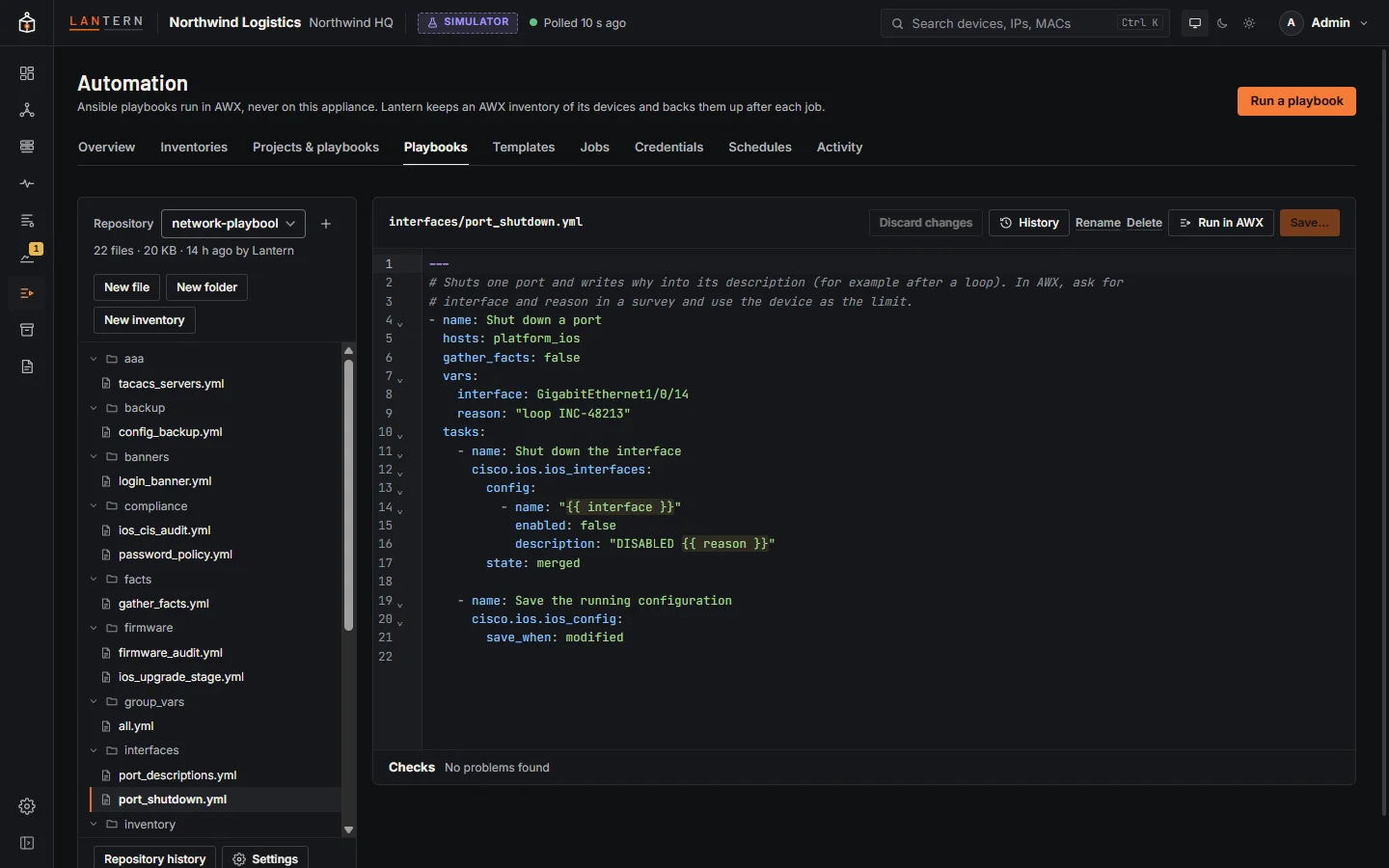
- The file list on the left has New file, New folder and New inventory, and folders can be renamed or deleted. Files have Rename, Delete and History.
- The editor highlights YAML and Jinja2 and checks the file as you type. Problems appear as markers in the text and in the Checks panel:
- YAML that does not parse, and tabs used for indentation;
- the shape of a playbook: plays with
hosts:, task lists, tasks that call a module; - network hints, such as short module names (
ios_configinstead ofcisco.ios.ios_config),connection: local, or a play that uses network modules without a network OS; - unbalanced Jinja2 brackets;
- secrets in clear text: passwords, keys, tokens, SNMP communities, private keys, and Cisco or Junos password strings. Use Ansible Vault or AWX credentials instead.
- Save… (or Ctrl S) asks for a commit message and saves the file as one commit with your name. Checks are advice only: the one thing that stops a save is YAML that does not parse, and even then you can choose Save anyway.
- If someone else saved the file after you opened it, Lantern refuses the save rather than overwrite their work. Copy my text, then Reload.
Binary files and files over 1 MB are listed and kept, but cannot be edited here.
History
History (for one file) or Repository history lists every commit with its author and message. Choose a commit to see What this commit changed or how it differs from the latest version. Restore this version brings a file, or the whole repository, back as a new commit: history is never rewritten, and nothing is ever deleted from it.
Clone with git
Lantern serves each repository at /git/<name>.git, for cloning and fetching only:
git clone https://lantern.example.com/git/network-playbooks.git
Username: anything
Password: lnt_git_...The password is a read token. Administrators make them in the repository's Settings › Read tokens, for one repository or for all of them. Each token is shown once; Lantern keeps only a hash. Rotate and Revoke are there too. A read token can clone and fetch, and does nothing else in Lantern. After ten wrong tokens from one address in five minutes, that address is locked out for the rest of the five minutes.
Pushing to Lantern is refused: files change only through the editor, or through an external remote.
Use in AWX
In the repository's Settings › AWX, an administrator chooses Use in AWX. In the organization chosen in Settings › Ansible, Lantern creates:
- a Source Control credential, Lantern git: name, holding a read token made just for it;
- a project, name (Lantern), that clones the repository's
mainbranch and updates on every launch.
Lantern then syncs the project, and syncs it again after every commit (Sync after each commit, on by default). The settings show the project's last sync and the Playbooks AWX found. If a project with the same address already exists, Lantern uses it instead of making another.
On a playbook, Run in AWX lists the job templates that run it and opens the usual launch dialog, with a dry run first (see Automation). If no template runs it yet, an administrator can create one on the Lantern inventory, with an optional device credential; it asks for the job type, diff, limit and variables at launch.
Stop using in AWX revokes the token and forgets the link; the AWX project stays in AWX until you delete it under Projects. After renaming a repository, choose Update the AWX project.
External git remote
An administrator can connect a repository to an external HTTPS git remote (address, user name, a token that may push to that repository, and branch) under Settings › External git remote:
- Mirror: push after each commit, or only when someone chooses Push now. Lantern never force-pushes: if the remote has commits Lantern does not, the push is refused.
- Pull from remote: brings in new commits, only when they follow on from Lantern's own. A pull that has diverged is refused with an explanation, and every new file is checked first.
The last push and pull are shown with who did them and the result. SSH remotes are not supported in this version.
The inventory builder
For playbooks that should not use Lantern's dynamic inventory, or for hosts Lantern does not know, you can build a static Ansible inventory file by clicking and dragging. The builder writes the YAML for you, and you can still edit the text by hand: both views edit the same file.
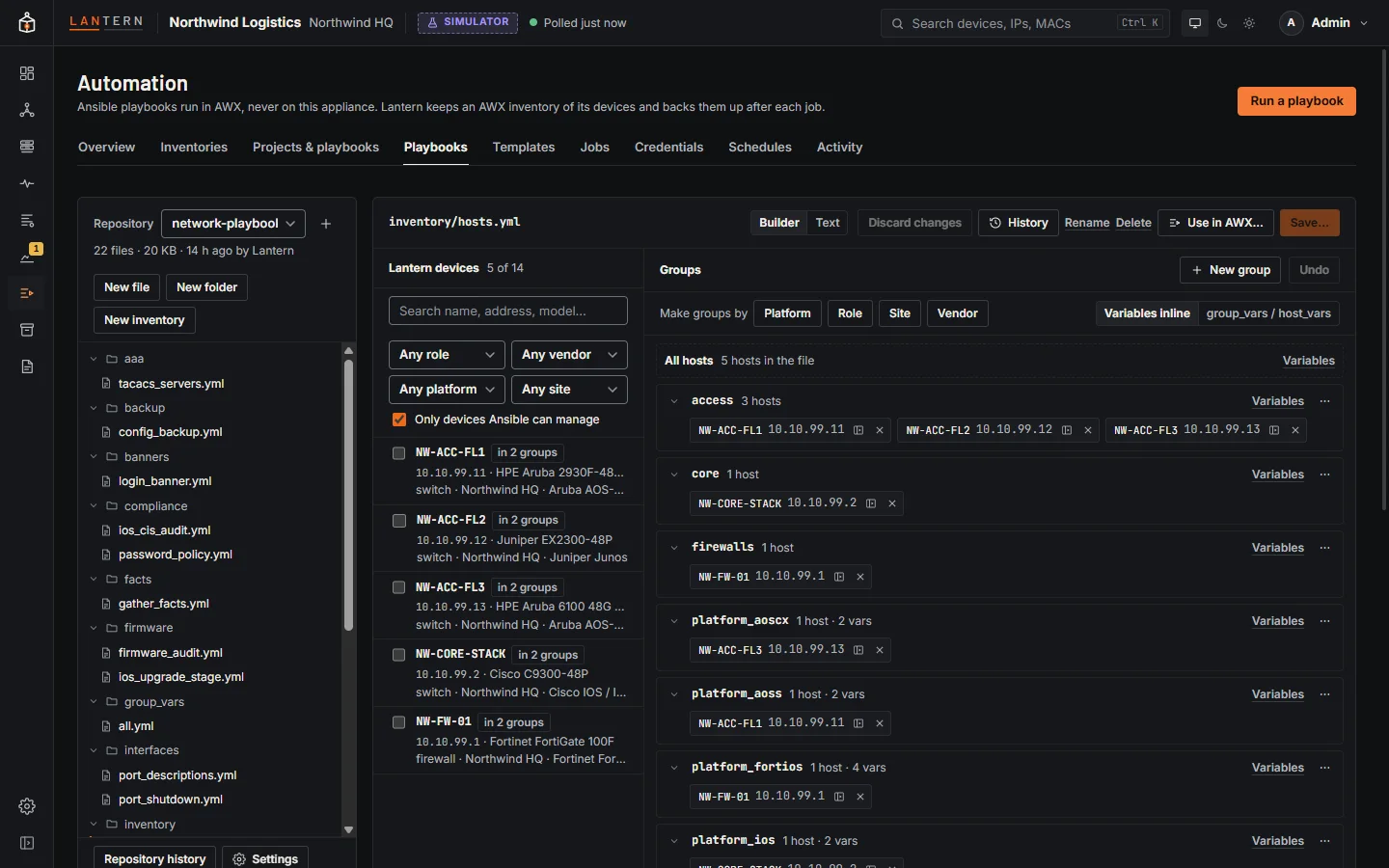
Open it with New inventory in the file list, or Build an inventory file on Automation › Inventories. YAML files under inventory/ or inventories/, and files called hosts.yml or inventory.yml, open in the builder; switch between Builder and Text in the editor header.
- Lantern devices (left): search and filter by role, vendor, platform and site. Only devices Ansible can manage is on by default. Tick devices (Shift for a range).
- Groups (middle): All hosts and your groups. Drag devices onto a group; drag a host to another group to move it (hold Ctrl to add it there too); drag a group onto another to nest it. Every drag has a button too: Add to group…, a host's move button, and a group's menu (New subgroup…, Rename…, Move under…, Delete). Add a host by hand… adds a host Lantern does not know. Undo steps back.
- Make groups by Platform, Role, Site or Vendor puts the devices into the same groups the Lantern inventory uses, with each platform's connection settings on its platform group.
- Variables: for each host, group or all hosts, a small form with common Ansible variables. Lantern devices get their management address automatically. Values that look like passwords or keys are refused: use Ansible Vault.
- Variables inline or group_vars / host_vars: keep variables in the inventory file or in separate files next to it. The files are saved in the same commit.
- YAML (right): the file as it will be saved, updating as you work. Tidy reformats it; Edit in text editor switches to the text view.
Saving checks the inventory as Ansible would read it, and warns about hosts with no address that DNS might not resolve, hosts listed twice, and variables set in more than one place.
When the repository is used in AWX, administrators can choose Use this file as an AWX inventory after saving. Lantern creates an AWX inventory sourced from the file and updates it; do it again to update it later.
Roles
| Role | Can |
|---|---|
| Viewer | See repository names and their latest commit. |
| Operator | Open, edit and save files, see history and diffs, restore versions, and use the inventory builder. |
| Administrator | Also create, rename and delete repositories, manage read tokens and remotes, and use repositories in AWX. Deleting a repository and changing a remote ask for your password again if you last signed in more than 15 minutes ago. |
Limits in this preview
- 1 MB per file, 2,000 files per repository, 128 MB per repository including history, and 50 repositories.
- The editor saves one file at a time (plus file and folder operations).
- Host ranges such as
sw[01:04]are kept but shown as one host in the builder. - Shallow clones are not offered.