Network mapping & monitoring
Bring your network into the light.
Map your topology, trace VLANs, and uncover the devices and issues hiding in your network.
- In your network, no cloud
- Read-only SNMP
- Windows or Linux
- Cisco, HPE Aruba, Juniper, Fortinet, UniFi
- Preview 0.2, simulator included
VLAN visibility
See where your VLANs go.
Pick a VLAN and the links that carry it light up across the map. Trunks that disagree on both ends and VLANs stranded behind them are called out.
See it in the product: the map and VLAN highlightingLoop detection
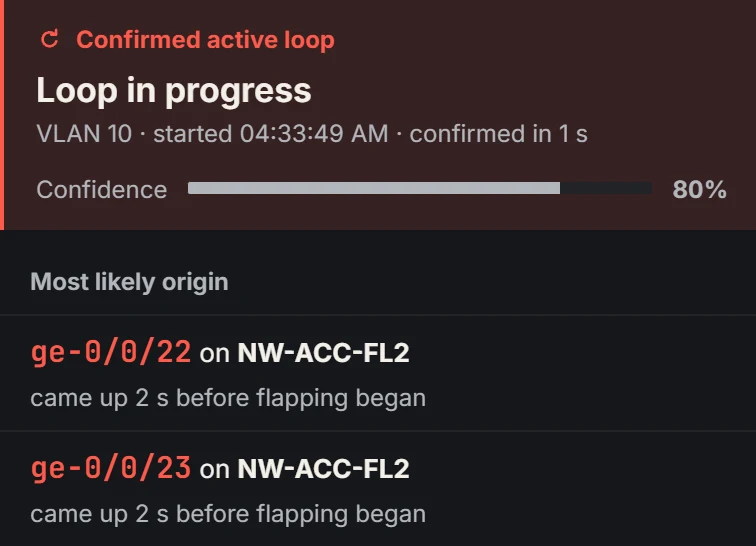
Spot the connection that comes back around.
A loop is declared only when the evidence agrees: MAC addresses flapping, broadcast storms, a switch hearing its own LLDP, a port that came up just before the flapping began. Then Lantern points at the port where it most likely starts. Send your switches’ syslog to the collector: the flaps and link-ups that confirm a loop arrive that way.
Inventory & lifecycle
Know what you have, and what’s next.
Every switch, port and PoE budget in one inventory: which ports are free, which switches are close to their power limit, and where each device is plugged in. Print it as a report for planning. In this preview, end-of-support dates come from a sample catalogue, so treat them as examples.
See it in the product: inventory and reportsHow it runs
Inside your network, on your terms.
Install one collector on a Windows or Linux machine. It polls your switches, routers, firewalls and access points over SNMP v2c or v3, follows their LLDP and CDP neighbours, listens for syslog, and serves the web UI itself. It understands Cisco, HPE Aruba, Juniper, Fortinet and UniFi; validation on real equipment continues through the preview.
How Lantern keeps your network safe- Read-only
- Lantern never changes a device on its own. Its SNMP access is read-only, and an automated test fails if any code adds a device write path.
- Stays on site
- Your data lives on the collector. There is no Lantern cloud, and nothing is sent to us.
- Your sign-in
- Local accounts, Active Directory or LDAP, or single sign-on with Entra ID, Google Workspace, Okta or any OpenID Connect provider, with roles. Single sign-on is new in this preview.
- Recorded SSH
- A command reaches a device only when a technician types it in an SSH session started from Lantern. Every session is recorded with secrets redacted, and SSH can be turned off entirely.
Also in the box
A clearer picture of your network.
Start on the built-in simulated network: cause a loop, take a switch down, then point Lantern at your own.